
To use different models in one voice agent, split the call into jobs, give each job its own agent and model, and hand the call between them. Frameworks such as Pipecat can switch models in code. Dograh, the open-source AI voice agent platform, sets models per agent and joins agents with Transfer To Agent, self-hosted or on Dograh Cloud.
Key Takeaways
- Split by job, a fast model for talk and a stronger one for tool steps.
- A backup model that covers errors or silence is a fallback, not a second job.
- Dograh sets models per agent and hands the live call between agents.
A fast model keeps small talk snappy, but it can fumble a booking that needs four tool calls. We cover why teams split models by job and how frameworks switch them in code. Then we talk about how Dograh does it with one agent per job and a backup model.
Why teams split models inside one call
Teams split models because no single model is both the fastest and the most reliable at tool calls. The open aiewf-eval benchmark runs 30-turn voice conversations with tool calls and records each model's pass rate and median time to first answer token. In its October 2026 results, gemini-3.7-flash at low thinking passed 99.9% of turns at 821 ms, while gemini-3.5-flash-lite at minimal thinking passed 94.3% at 617 ms, both over 30 conversations. gpt-4.1-mini passed 81.8% at 638 ms, in only 13 conversations.
That gap is the whole argument. Most of a call is greeting, listening and short answers, where the roughly 200 ms between those two flash models matters more than a few points of accuracy. A few moments, such as checking a slot, writing a record or reading back terms, need the model that gets tool calls right. Other reasons to split are a different voice or language for part of the call, and a stronger model only for the callers who need it.
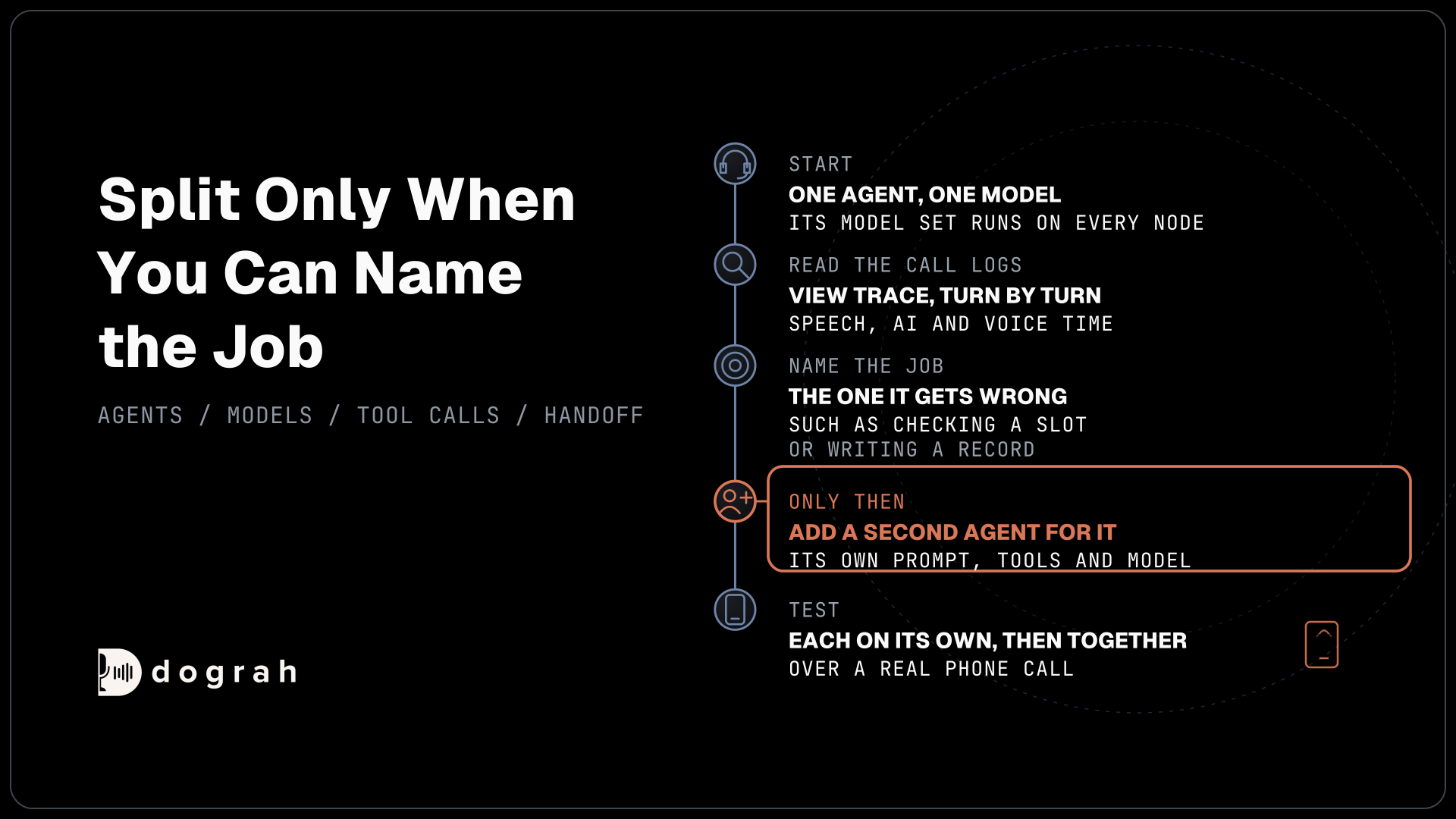
The opposite view is fair too. Picking one model per workload and testing it on your own calls avoids handoffs entirely, and for a short single-purpose agent that is usually the right call. Split only when you can name the job that the main model gets wrong.
Three ways to split the work
There are three common ways to give one call more than one model. The first switches the active model in place, inside one agent, when the conversation reaches a certain point. It keeps one prompt and one context, but every switch is a choice your code makes, and both models must handle the same tools.
The second hands the live call to another agent that has its own prompt, tools and model. The caller stays on the line and the new agent picks up the conversation. This keeps each agent small and testable, and it is how our guide to multilingual voice agents routes callers to a language-specific agent.
The third runs side jobs on their own model, such as a call summary, quality scoring or voicemail detection. These never speak to the caller, so a slower model is fine. A backup model that only steps in when the main one fails is something else again, since it covers failure rather than splitting work.
How frameworks switch models in code
Code frameworks offer both of the first two designs. Pipecat's LLMSwitcher holds a list of LLM services in one pipeline, and your code switches the active one by queuing a frame that names the chosen service. Only the active service processes frames, so the change takes effect on the next turn and the conversation context stays where it was.
LiveKit Agents takes the handoff route. Each agent can set its own speech-to-text, LLM, voice and turn detection in its constructor, overriding the session's defaults, and a tool call returns a new agent to hand the session over. Realtime speech-to-speech models change the same way, by handing off to a new agent.
Both approaches put the switching rule in your code. That is flexible, and it also means every rule is yours to write and keep up to date as models change.

Open Source Alternative to Vapi / Retell
Self-hosted voice agent platform — no per-minute fees
dograh-hq/dograh
Star on GitHub
What has to carry over at the handoff
A handoff works only if the caller never has to repeat themselves. The new agent needs the conversation so far, ideally as a transcript it can read rather than a summary that drops details. It does not need the old agent's instructions or raw tool results, which can confuse it into acting on the wrong job.
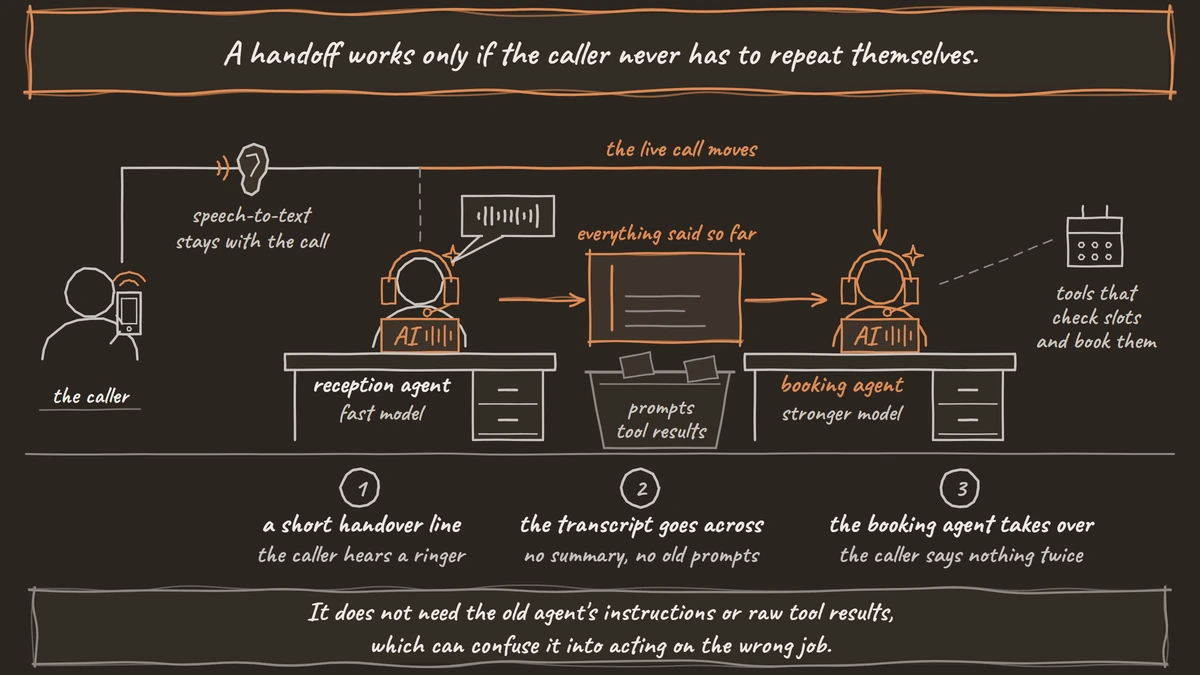
Timing matters as much as content. Starting a new model takes a moment, and silence on a phone line reads as a dropped call, so the caller should hear a short handover line and some audio while the next agent gets ready. The ear can usually stay. Keeping the same speech-to-text stream through the handoff avoids a gap in listening, and only its language needs to change if the new agent speaks another one.
One model set per agent in Dograh
Dograh is the orchestration layer that runs the call flow, tools and telephony, and the speech and language models are a separate layer you choose. Models are chosen per agent. Each agent picks one model configuration on the editor's Model tab, either a Preset configuration from the Models page or a Custom one, and that configuration names the speech-to-text, LLM and voice. The live conversation uses that one set on every node of the agent, and the only nodes with their own LLM setting are side jobs that never talk to the caller, the QA node and voicemail detection.
To use a different model for a different job, build a second agent and hand the call to it with the Transfer To Agent tool. The current agent speaks a short handover message, the caller hears a ringer while the next agent is prepared, and the new agent takes over at its Start Call node. It receives a labelled transcript of everything said so far, with no LLM summary, and the first agent's prompts and tool results are filtered out.
The destination brings its own prompt, tools, LLM and voice, while speech-to-text and the recording stay with the call. When both agents use the same speech-to-text provider and model, the new agent's language settings are applied to the live stream. Greeting mode decides how the new agent opens, with its own greeting, straight into a reply, or with a fixed introduction. Transfer To Agent works on every cascade call, web calls included, so build both agents as cascades.
Changing models per call and adding a backup
Two more controls change models without a second agent. A call started through the API trigger can override the agent's speech-to-text, LLM and voice for that one call. Pre-Call Data Fetch on the Start Call node can change the LLM, the LLM fallback and the voice from your own system's answer, for example a stronger model for a premium account.
The backup model is set on the model configuration. Open Models in the sidebar, edit the configuration and click Configure fallbacks on the LLM part. The LLM fallbacks page has two rules. Slow response starts the backup if the main model gives no answer text or tool call within a wait you set, 1,500 ms by default. Request error starts it on any error before output, rate limits included. Fallbacks are off until you add one, and they run on your own LLM keys rather than in Dograh mode. Put the backup on a different provider, so one provider's outage does not take out both.
Join the Dograh Community
Dograh is an OSS alternative to Vapi. Join our Slack community for queries, releases, best practices & community interactions.
A worked split, reception and booking
Take a clinic line where most calls are questions and a few are bookings. The reception agent runs a fast model. It greets the caller, answers hours and directions from the knowledge base, and works out what the caller wants. Its only tool besides End Call is a Transfer To Agent tool named "Transfer to Booking", described as "Use only when the caller wants to book, move or cancel a visit".
The booking agent runs a stronger model with the HTTP API tools that check slots and book them. Its Greeting mode is set to continue, so it picks up from the transcript instead of greeting the caller twice. If booking fails, its prompt offers a callback request through another tool. For when a small model is enough on its own, see our post on small language models for voice agents.
Each agent is tested on its own first, then together. Splitting this way means a prompt change in reception can never break the booking rules, which is often a bigger win than the model choice.
Testing the split and choosing where it runs
Test the handoff over a real phone call, not only in the browser, and listen for the gap between the handover line and the new agent's first words. Each call's View Trace shows speech-to-text, AI and voice time for every turn, so you can see what the stronger model adds on the booking side. Our guide to choosing an LLM for voice agents covers how to test tool calls before you pick each model.
With your own keys, each provider bills your account wherever the platform runs. Running Dograh yourself means no per-minute platform fee. You still pay for servers, model keys and phone minutes, and your team looks after the database and upgrades. Support comes from the open-source community, and Enterprise adds custom SLAs. If you would rather not host it, Dograh Cloud runs it for a 1 cent a minute platform fee.
Start with one agent and one model, and add a second agent only for the job your call logs show the first one getting wrong.
Glossary
- Handoff
- Moving a live call from one agent to another, each with its own prompt, tools and model, while the caller stays on the line and the conversation carries over.
- LLM fallback
- A backup language model that takes over only when the main one errors or gives no output within a set time. It covers failure, not a separate job.
- Time to first answer token
- How long a model takes to produce the first word of its answer or its first tool call. aiewf-eval reports the median for each model.
- Model configuration
- A saved set of speech-to-text, LLM and voice choices. In Dograh each agent uses one, picked on its Model tab.