
The best low-latency voice AI platforms show each turn's timing and let you change what slows it. For teams that want to own the platform, Dograh is the open-source AI voice agent platform you can self-host or run on Dograh Cloud, and it ranks first on showing and cutting per-turn delay, ahead of LiveKit Agents, Pipecat, Vapi, Retell and PolyAI.
Key Takeaways
- Dograh shows a Reasoning Delay on every reply and per-turn timing in View Trace.
- Vapi measures turn latency on its own servers, so the caller's network is not included.
- Test on 20 real phone calls and compare the slow tail, not the best one.
A voice agent feels slow when the caller waits after speaking, and the delay can hide in any layer of the call. We set what latency means on a phone call, rank six platforms by how well they let you find and cut it, starting with open-source Dograh.
What latency means on a phone call
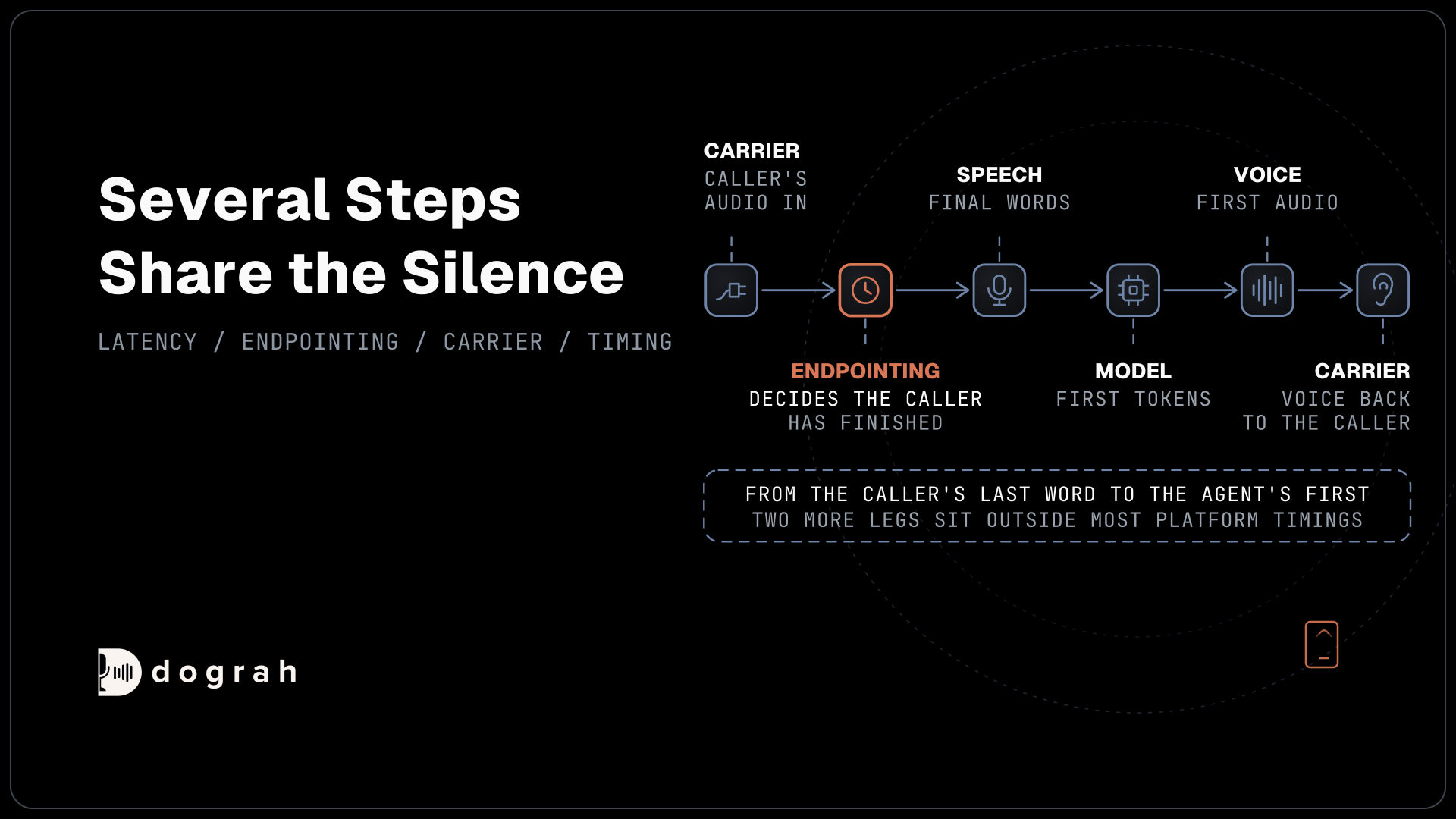
On a call, latency is the gap between the moment the caller stops speaking and the moment they hear the agent's first word. A common bar is under about 800 milliseconds end to end, and our post on the latency budget breaks that down part by part. In ordinary conversation people leave gaps of around 300 milliseconds between turns, which is why a full second of silence on a call already feels like the agent is lost.
Several steps share that gap. The platform first has to decide the caller has finished, which is called endpointing. Speech-to-text then produces its final words, the language model sends its first tokens, and the voice engine returns its first audio. Speech-to-text is often the slowest of these, and phone audio arrives at 8 kHz, which makes it harder to transcribe than a clean browser recording.
Two more legs sit outside most platform timings. The caller's audio travels through their carrier to the platform, and the agent's voice travels back the same way. A platform that measures from its own servers cannot see those legs, so its numbers will always look better than what the caller hears.
How we ranked the platforms
We did not rank on anyone's millisecond claims. Vendor figures come from different tests, models and regions, so they cannot be compared fairly. Instead we ranked on four questions about each platform.
First, can you see the time each turn took, split by layer, on your own calls? Second, can you change the layer that is slow, by swapping the speech, language or voice model? Third, can you choose where the agent runs, so it sits near your callers, your carrier and your model servers? Fourth, can you change the code or settings yourself, or do you need the vendor to do it?
A platform that scores well on all four lets you find a slow turn and fix it the same day. The ranking below follows those questions in order, and each entry states the hosting or build work that comes with it.
1. Dograh
Dograh, the open-source AI voice agent platform under the BSD 2-Clause license, shows timing where you build. In a test call, every agent reply in the Call Transcript carries a Reasoning Delay, the language model's time to first token for that turn. View Trace then opens the call in Langfuse with the speech-to-text, AI and voice time on each turn. Reasoning Delay covers one part of the turn, so read it next to the trace rather than against the 800 millisecond bar.
When one layer is slow, you change it. You pick the speech-to-text, LLM and voice provider for each agent, on your own keys or open models you host, including local models behind an OpenAI-compatible endpoint. With your own keys, an LLM fallback, off by default, hands the turn to a backup model if the main one errors or gives no output within a set time, 1.5 seconds by default. Our guide to reading call traces shows how to find the slow layer.
Where the agent runs is also yours to choose. You can self-host with Docker on at least 8 GB of RAM and 4 vCPUs, in the region next to your carrier and model servers, use the managed cloud, or take on-prem deployment on Enterprise. Our post on server colocation covers how placing them together trims network time. Self-hosted Dograh has no per-minute platform fee, but servers, model keys and phone minutes still cost money. Dograh Cloud charges a 1¢-a-minute platform fee. Run it yourself and the server, the database, the upgrades and the network tuning are your team's, with the community supporting the open-source edition and custom SLAs available on Enterprise.

Open Source Alternative to Vapi / Retell
Self-hosted voice agent platform — no per-minute fees
dograh-hq/dograh
Star on GitHub
2. LiveKit Agents
LiveKit Agents is an Apache-2.0 framework, and LiveKit Cloud adds observability on top. LiveKit's observability docs describe a Metrics tab with an agent turn latency chart and trace spans for the speech-to-text, LLM and voice steps, including the language model's time to first token on each turn.
You can change any layer in code, since every model is a plugin, and you can run the agent on LiveKit Cloud or on your own servers. That gives LiveKit nearly the same reach as the top pick on seeing and cutting latency. The difference is the work involved, since your engineers write and maintain the agent, the deployment and any dashboards you add when self-hosting.
3. Pipecat
Pipecat is a BSD-2-Clause Python framework from Daily. Pipecat's metrics docs describe metrics frames that report time to first byte and processing time for each service in the pipeline, so you can see which step held up a turn.
Like LiveKit, every layer is swappable in code and the agent runs wherever you deploy it, with Pipecat Cloud as a hosted option in several regions. Pipecat gives you the raw timings rather than a finished view, so a team usually sends the metrics to its own monitoring tool. It ranks below LiveKit because there is less built-in display of those numbers.
Join the Dograh Community
Dograh is an OSS alternative to Vapi. Join our Slack community for queries, releases, best practices & community interactions.
4. Vapi
Vapi is a hosted platform with a detailed per-turn breakdown. Vapi's latency docs describe turn latencies split into transcriber, endpointing, model and voice time, plus a Latency Summary in the dashboard. Showing endpointing on its own is useful, since waiting to decide the caller has finished is often a hidden part of the delay.
Vapi notes that these figures are measured on its servers, so the caller's network is not included. You can change models and endpointing settings in the dashboard, while the platform itself runs as Vapi's hosted service, so the carrier legs stay something to test on real calls.
5. Retell
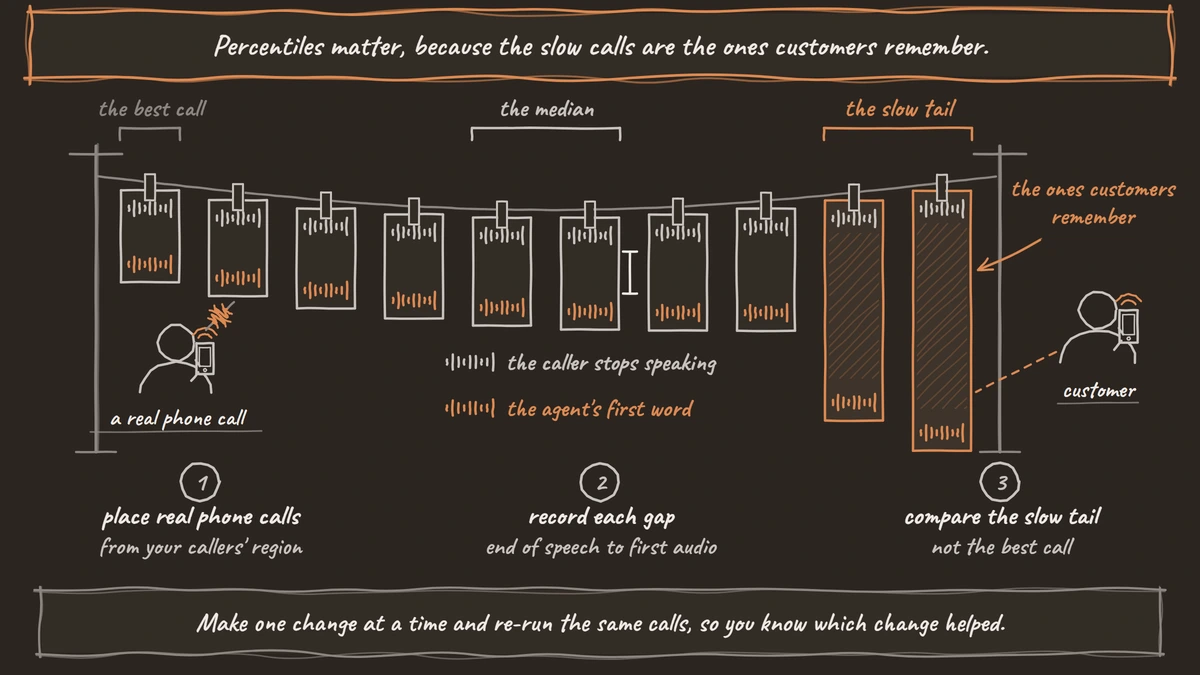
Retell's Call History shows end-to-end latency at the 50th, 90th and 99th percentiles, and Retell's latency docs describe a latency object on each call with end-to-end, speech recognition, language model and voice timing. Percentiles matter, because the slow calls are the ones customers remember.
Retell's troubleshooting guide suggests a faster model, a shorter prompt, endpointing settings and a phone number in your users' region, plus a faster tier on dedicated infrastructure at extra cost. Those are useful controls, and they all sit inside Retell's hosted product.
6. PolyAI
PolyAI gives the least direct control of the six, because it is a managed service. PolyAI's diagnosis docs describe a diagnostic layer for each turn that shows the language model requests, function calls and total response time.
That view helps you spot a slow tool call or a long prompt. PolyAI runs the platform and recommends its own Raven model, so cutting latency further mostly means working with PolyAI on its side. For a contact center that wants the vendor to own performance, that can be the right trade.
The six platforms in one table
The table sums up what each platform lets you see and change, with no latency figures. Read it as a map of where you can look when a call feels slow, and of how much of the fix is in your hands.
| Platform | Per-turn timing you can see | What you can change | Where it runs |
|---|---|---|---|
| Dograh | Reasoning Delay on each reply, View Trace per turn | Speech, language and voice model per agent, local models, LLM fallback | Your servers, Dograh Cloud or on-prem on Enterprise |
| LiveKit Agents | Turn latency chart and per-step spans on Cloud | Any layer in code | LiveKit Cloud or your servers |
| Pipecat | Time to first byte and processing time per service | Any layer in code | Your servers or Pipecat Cloud |
| Vapi | Transcriber, endpointing, model and voice time per turn | Models and endpointing settings | Vapi's hosted service |
| Retell | Percentiles in Call History, per-layer timing per call | Model, prompt, endpointing, number region, faster tier | Retell's hosted service |
| PolyAI | Model requests, function calls and total time per turn | Prompt, tools and model choice, with PolyAI on Enterprise | PolyAI's cloud |
How to measure latency on your own calls
Rankings point you to a shortlist, and your own calls decide. Place 20 or more real phone calls from the region your callers live in, not browser tests, since a browser skips the carrier legs and the 8 kHz phone audio.
For each turn, record the gap from the end of the caller's speech to the agent's first audio, using a call recording for the full gap and each platform's per-turn data for the parts. Keep the prompt, models, voice and tools the same on every platform you test, so the only change is the platform.
Once you know which layer is slow, the fix usually follows. A slow speech-to-text step points to a streaming model or a region closer to the caller. A slow model turn points to a smaller model, a lower reasoning setting or a shorter prompt. A slow voice step points to a faster voice model or a nearer region, and a long pause before any of them points to endpointing. Make one change at a time and re-run the same calls, so you know which change helped.
Compare the median and the slow tail, such as the 90th percentile, rather than the best call. Telnyx, which sells phone lines and voice agents, argues that where the call enters the network matters as much as the model. Its own ranking puts Telnyx first, but the point stands, so run the test from your callers' region and over the carrier you plan to use.
Glossary
- Endpointing
- How a platform decides the caller has finished speaking. Waiting too long adds delay to every turn, and cutting in too early interrupts the caller.
- First audio
- The first sound of the agent's reply. The gap from the end of the caller's speech to it is the delay the caller actually hears.
- Slow tail
- The slowest share of turns, often read as the 90th or 99th percentile. Callers remember these turns more than the typical one.
- Carrier leg
- The path a call's audio takes through the phone network between the caller and the platform. Most platform timings start after it.