Arabic AI voice agents work best when each line is set to the dialect its callers speak, whether Gulf, Egyptian, Levantine or Maghrebi. Speech-to-text covers all four across several providers, while dialect voices are thinner. For teams that want a provider per dialect, Dograh, the open-source AI voice agent platform, runs them on your keys, self-hosted or on Dograh Cloud.
Key Takeaways
- Speech-to-text lists Gulf, Egyptian, Levantine and Maghrebi Arabic across several providers.
- Egyptian and Levantine voices are mostly Azure's two standard voices per locale.
- In Dograh, set one Arabic dialect code per agent and test it on calls.
Arabic is one name for several spoken languages, and a caller from Cairo does not sound like one from Riyadh. We cover the dialect families and which providers list each one, then we talk about how to test a dialect before launch and run it in Dograh.
Why dialect matters on a phone call
Arabic speakers write and read Modern Standard Arabic (MSA), but on the phone they speak their own dialect. The big families are Gulf Arabic, Egyptian, Levantine from Syria, Lebanon, Jordan and Palestine, and Maghrebi from Morocco, Algeria and Tunisia. Everyday words, numbers and even the word for "now" change between them, so a model tuned on one can stumble on another.
Numbers and names add their own trouble. Callers may say an amount in Arabic or in English, or switch halfway through it, and French words are common on Maghrebi lines. Names also have several Latin spellings, so Mohammed can reach your system as Muhammad or Mohamed unless a step checks it.
Most speech models learned a lot of MSA from news and written text, and far less of each spoken dialect. Speechmatics argues that models trained mostly on MSA miss what callers actually say, and that choosing one dialect per line is a fragile assumption, because callers do not announce their dialect.
That second point is fair, and it shapes how you set the agent up. A per-dialect setting works well when you know who calls a line, such as a support number in Egypt or a branch line in Dubai. When callers come from everywhere, a model that covers many dialects in one pack is the safer pick, and either way the choice has to be tested on real calls.
Speech-to-text by dialect
Speech-to-text is the stronger side of Arabic voice AI. The table shows which dialect codes each provider lists, from its own language page or the options Dograh passes it.
| Provider | Gulf | Egyptian | Levantine | Maghrebi | Arabic and English mixed |
|---|---|---|---|---|---|
| Deepgram Nova-3 (Dograh's own STT) | UAE, Saudi Arabia, Qatar, Kuwait | Egypt | Syria, Lebanon, Palestine, Jordan | Morocco, Algeria, Tunisia | Not listed |
| Google Speech-to-Text | UAE, Bahrain, Kuwait, Oman, Qatar, Saudi Arabia | Egypt | Jordan, Lebanon, Palestine, Syria | Algeria, Morocco, Tunisia, Mauritania | Not listed |
| Azure Speech | Gulf locales among 18 Arabic locales | Egypt | Jordan, Lebanon, Palestine, Syria | Algeria, Morocco, Tunisia | Not listed |
| Speechmatics | One Global Arabic pack covering the Gulf | Covered by the same pack | Covered by the same pack | Not named | Bilingual ar_en pack |
| Soniox, ElevenLabs Scribe, Cartesia ink-whisper | General Arabic only | General Arabic only | General Arabic only | General Arabic only | Not listed |
Speechmatics' language list describes its Global Arabic pack as covering MSA and Arabic spoken in the Gulf, Egypt and the Levant, and its ar_en pack as supporting all the Arabic and English accents it lists. Speechmatics reports a 4.5% word error rate on colloquial Arabic in its own tests, against 5.9% for Google.
Azure Speech lists 18 Arabic speech-to-text locales, and Google's language list splits Arabic by country in the same way. Use the table as a shortlist for the test later in this post, since a listed code says nothing about accuracy on your callers.
Voices by dialect, and where support is thin
Voices are where Arabic support gets thin. Azure covers the most dialects, with 16 Arabic voice locales from the Gulf to the Maghreb, but each has two standard voices and none has an HD voice. For Egyptian and Levantine callers, those two voices per locale are most of what the large providers offer.
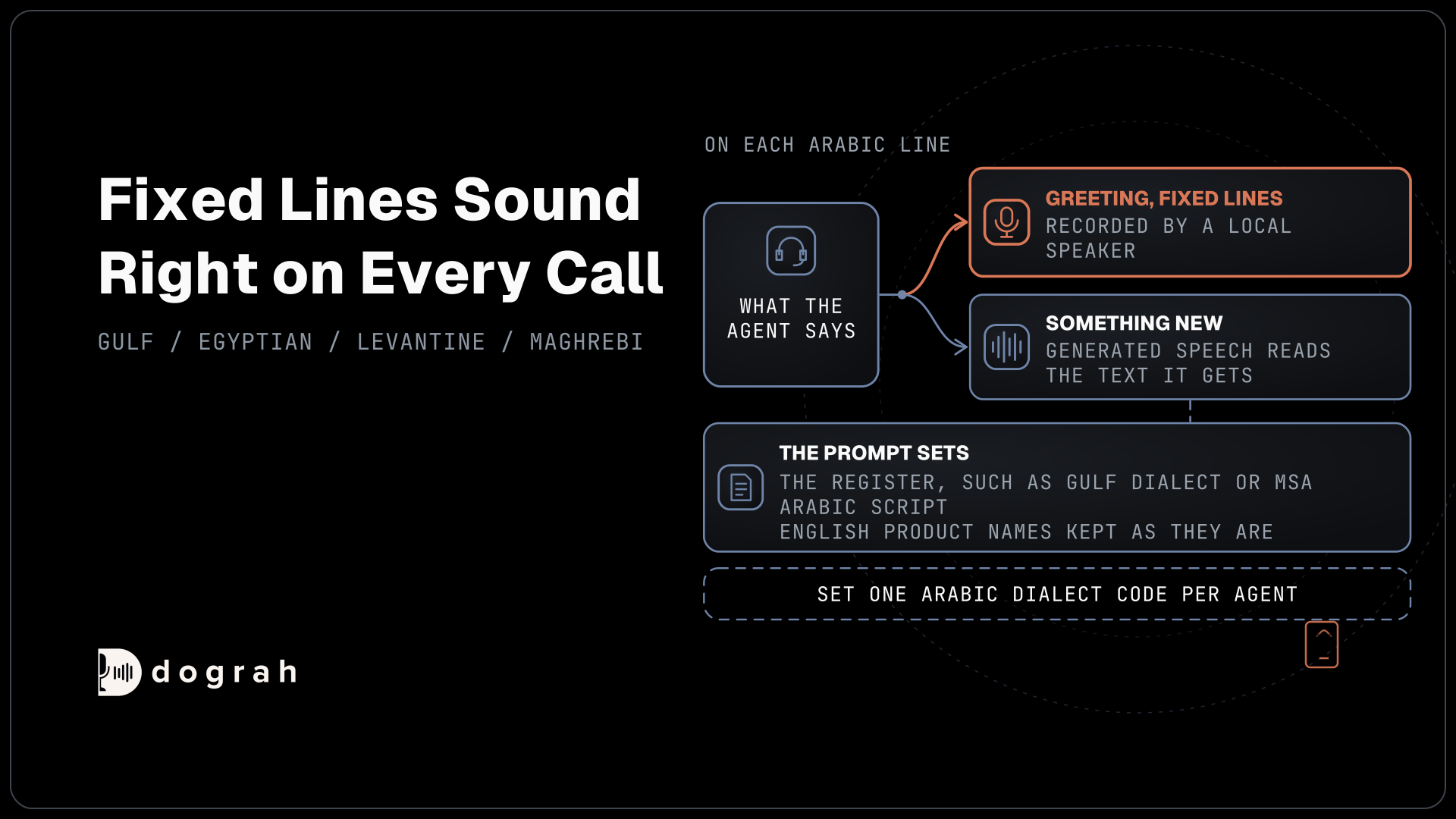
ElevenLabs lists Arabic for Saudi Arabia and the UAE on its Multilingual v2 and Flash v2.5 models, which suits Gulf lines. Google's Chirp 3 HD voices use one general Arabic locale rather than one per dialect. On the open side, Chatterbox's multilingual model, under the MIT license, lists Arabic and can clone a voice, which lets a team record a local speaker and keep that voice across the call. Pre-recorded clips help too. A greeting and the fixed lines recorded by an Egyptian or Lebanese speaker sound right on every call, and Dograh falls back to generated speech only when the agent needs to say something new.
What the voice reads also matters. A reply written in MSA sounds formal on a Cairo line, and a reply written in dialect can trip a voice trained mostly on MSA. Our post on how MSA and dialect change what a voice says covers that choice, so settle it in the prompt before you judge any voice.

Open Source Alternative to Vapi / Retell
Self-hosted voice agent platform — no per-minute fees
dograh-hq/dograh
Star on GitHub
Arabic and English on the same call
Many Gulf callers mix Arabic and English, especially for product names, numbers and work terms. On the hearing side, Speechmatics' ar_en pack is built for that mix, and the other providers here are set to one language per agent. On the speaking side, no provider here promises a voice that mixes Arabic and English naturally, so keep each reply in one language.
The prompt decides what the agent says back. Tell the language model which register to answer in, Gulf dialect or MSA for example, to write in Arabic script and to keep English product names as they are. A voice reads the text it gets, so a clear rule here does more for the sound of the call than switching voices.
When the agent cannot tell which language the caller wants, it should ask a short question, such as "Arabic or English?", and switch only after the caller confirms. If support for a caller's language or dialect is thin, a handover to a person beats guessing. Our post on language switching mid-call covers the ask-and-confirm pattern in full.
Testing an Arabic agent before launch
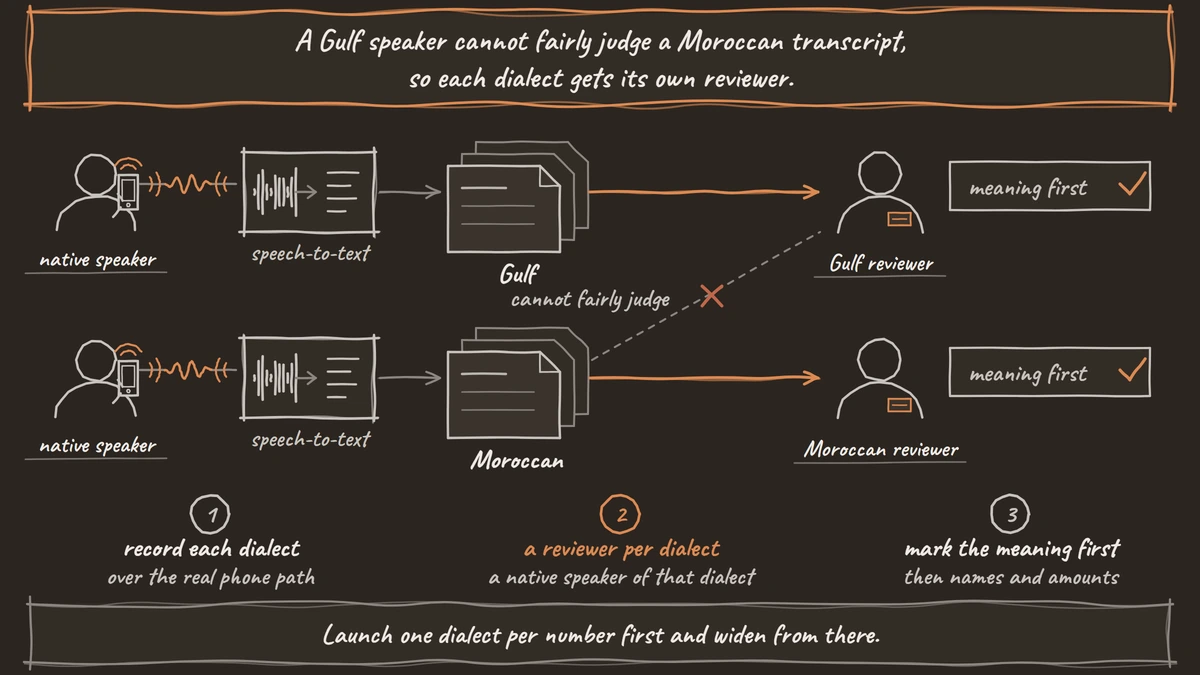
Test every dialect you serve on its own. Here is a plan we wrote for it. For each dialect, collect 30 or more short recordings from native speakers over the real phone path, mixing greetings, names, amounts, dates and a few Arabic-English switches. Run them through each speech-to-text option you are considering.
A native speaker of that dialect then reads every transcript. A Gulf speaker cannot fairly judge a Moroccan transcript, so each dialect gets its own reviewer. Mark the meaning first, then the details that drive actions, such as names, account numbers and amounts. For those details, have the agent read them back and ask the caller to confirm, since a misheard digit costs more than one extra turn.
Then judge the voice. Have the shortlisted voices read the agent's real replies over the same phone line, and ask listeners from that dialect whether they sound right. Most phone calls reach the agent as 8 kHz audio, so a voice that sounds good in a browser can sound flatter on a handset.
Launch one dialect per number first and widen from there. After launch, keep a reviewer for each dialect reading flagged calls, since only a speaker of that dialect can tell when a clean-looking transcript has the meaning wrong.
Join the Dograh Community
Dograh is an OSS alternative to Vapi. Join our Slack community for queries, releases, best practices & community interactions.
Setting up Arabic in Dograh
In Dograh, models are chosen per agent, in the editor's Model tab, through a model configuration with LLM, STT and TTS tabs. Dograh's own speech-to-text lists Arabic by dialect in the Language dropdown, with labels such as "Arabic (Egypt)", "Arabic (Lebanon)", "Arabic (Morocco)" and "Arabic (UAE)". Multilingual (Auto-detect) runs on Deepgram Flux, whose auto-detect set covers other languages, so pick the Arabic dialect code directly.
Other providers run on your own keys. Speechmatics offers "ar" and the bilingual "ar_en", Google offers 19 Arabic codes, and Azure shows ar-SA in its list and accepts other locales typed in, such as ar-EG, along with a typed voice name for an Egyptian voice.
Each number can point at its own agent through its Inbound workflow setting, so a Cairo line and a Dubai line can run different dialects. Greeting Text plays before the agent hears the caller, so on a bilingual line write it in both, for example "Marhaba, hello". Names and terms that Dograh's own speech-to-text, Deepgram, Speechmatics or Soniox misses go in Dictionary in the agent's Settings. Transfer Call works on Twilio, Telnyx, Plivo, Cloudonix and Asterisk ARI, and Dograh calls the destination first and connects the caller only when someone answers. Our posts on Arabic AI voice agents for banking and real estate in the UAE show the Gulf setup in full.
Dograh is the orchestration layer that runs the call flow, tools and telephony, and the speech and language models are a separate layer you choose. Run on your own servers, it has no per-minute platform fee. Those servers, the model keys and the phone minutes are still on your bill, and the database and upgrades are your team's job. The open-source community provides support, and Enterprise adds custom SLAs. Dograh Cloud is the option for teams that would rather not host, at a 1¢-a-minute platform fee.
Glossary
- Modern Standard Arabic (MSA)
- The shared written form of Arabic used in news and documents. Callers rarely speak it, so models trained mostly on MSA can miss dialect speech.
- Dialect code
- A language code that names a regional form, such as ar-EG for Egyptian Arabic. Setting one tells speech-to-text which dialect to expect on a line.
- Bilingual language pack
- A speech-to-text model trained on two languages together, such as Speechmatics' ar_en, so mixed Arabic and English turns come back in one transcript.
- Standard voice
- Azure's older neural voice tier, below its HD voices. Azure's Arabic dialect locales each have two standard voices and no HD voice.