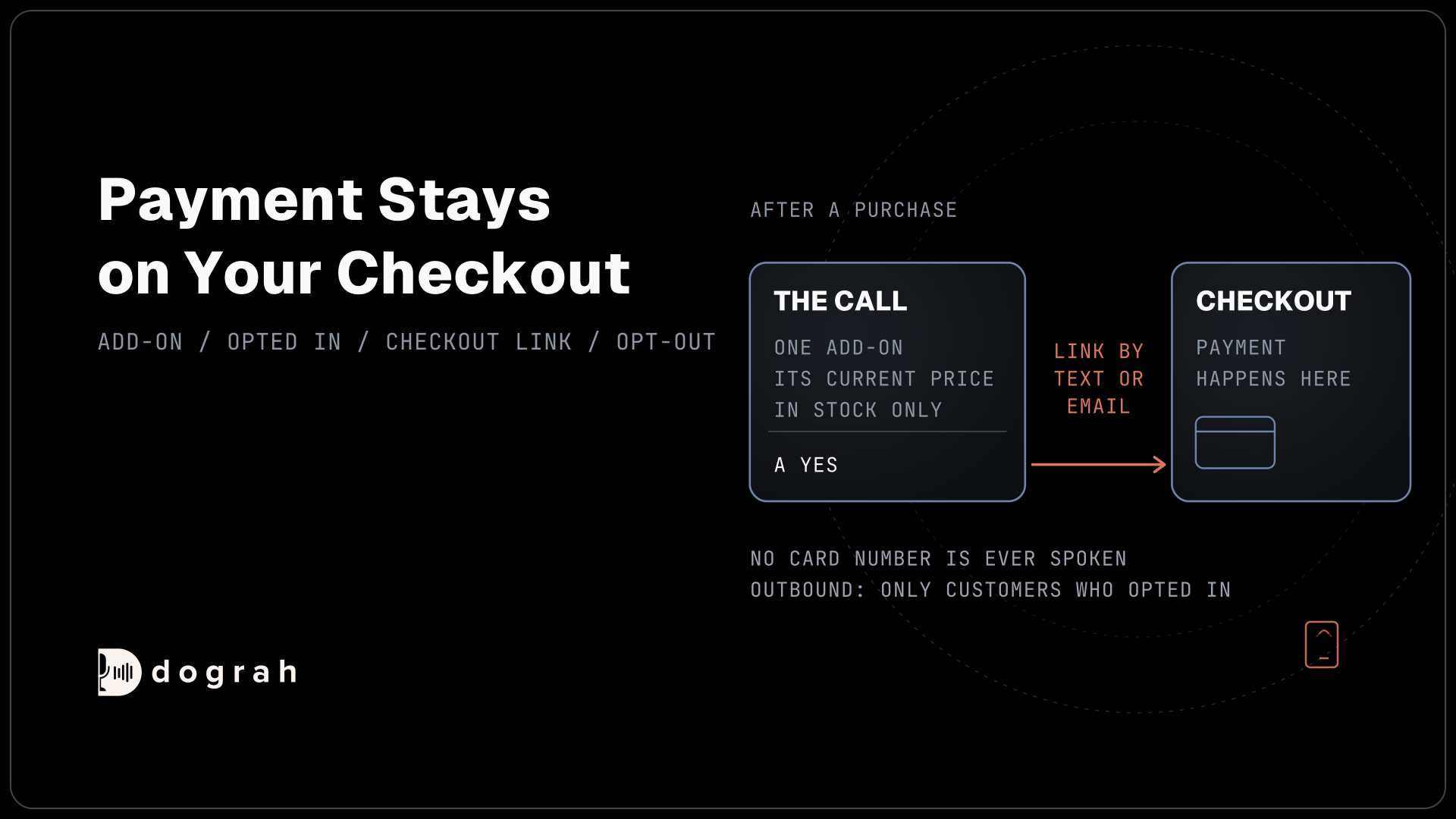

AI voice agents for upsell and cross-sell in e-commerce make one add-on offer after a purchase, with the item, price and stock taken from the store's own system. The offer comes at the end of a support call or on an outbound call to customers who opted in to sales calls. Payment goes through the store's checkout link.
Key Takeaways
- One add-on per order, picked by your store's rules, priced by your system.
- Call only customers who opted in to sales calls at checkout.
- The yes goes to your checkout link. No card number is ever spoken.
Every online order leaves room for one more item, and a phone call is a delicate place to suggest it. We cover how Dograh offers one add-on inside support calls or after delivery, sends payment to your checkout and handles a request to stop. It is part of our guide to AI outbound sales calls.
One add-on, picked by your store
Online stores sell more each quarter, and every order is a chance to suggest the item that goes with it. The Census Bureau's quarterly e-commerce report puts US online sales at $340.2 billion for the latest quarter, 17.1% of all retail and up 12.2% from a year earlier. A call can add to an order when it suggests one thing that fits, such as a spare battery for a camera or a case for a phone.
Your store picks the add-on, never the model. Keep the rules in your own system, for example a fixed accessory per product or a short list your team approved. Pre-Call Data Fetch can ask your store for this customer's order and the matching add-on as the call connects. Your system returns the add-on, its current price and whether it is in stock.
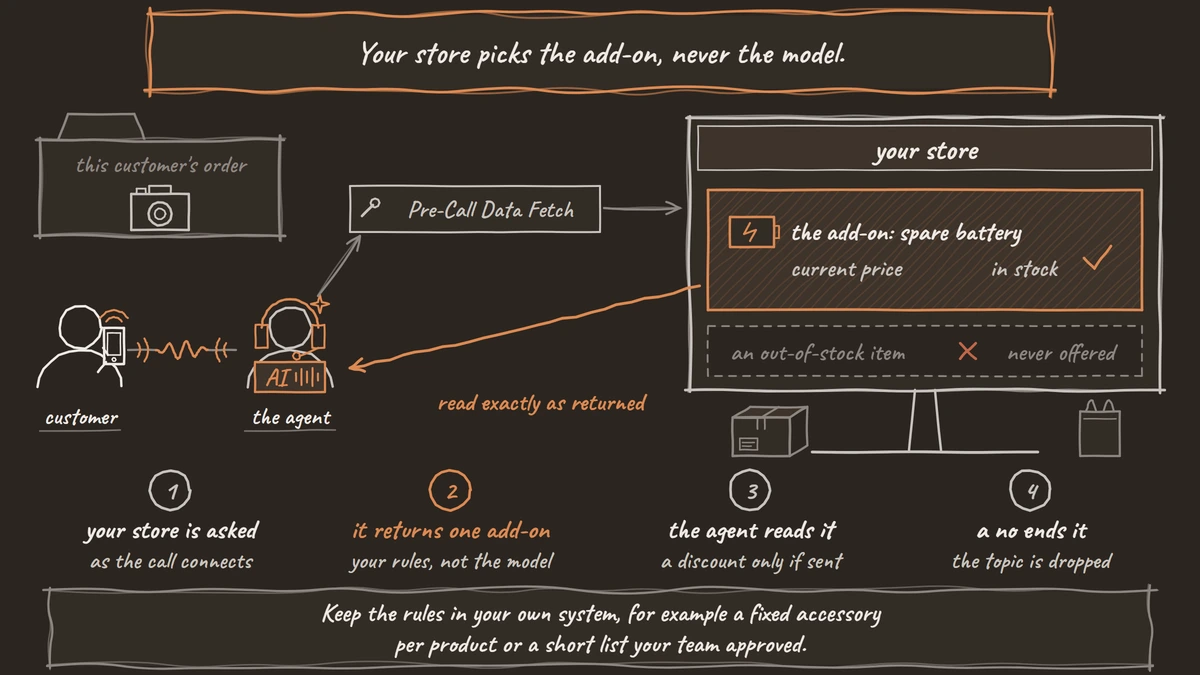
The prompt tells the agent to read that one offer exactly as returned, mention a discount only if your system sent one, and drop the topic after a no. An out-of-stock item is never offered. AI voice agents for upsell and cross-sell covers offer rules that hold across industries.
Offers inside a support call
The simplest place for an add-on is a support call the customer placed. The agent solves the request first, such as a delivery question or a size swap, and makes one offer only once that is done. A customer who is still upset hears no offer at all.
Verify the order before naming anything from it. The agent asks for the order number or the email used at checkout, and an HTTP API tool checks it against your store. Only then does it mention what was bought and the add-on that goes with it.
Because the customer started the call, an offer made in it generally needs no consent under the robocall rules. It is still a sales pitch, so keep it short, and tell the agent in the prompt to accept a no on the first try.

Open Source Alternative to Vapi / Retell
Self-hosted voice agent platform — no per-minute fees
dograh-hq/dograh
Star on GitHub
Calling customers after delivery
A call you place to make an offer is a sales call, and consent comes first. Since the FCC's 2024 ruling on AI-generated voices, an AI voice counts as an artificial voice under the Telephone Consumer Protection Act (TCPA). The FCC's calling rules then generally ask for prior express written consent before an artificial voice sales call goes to a shopper's mobile. For a store, that usually means a box at checkout, left unticked, that names your store and the number and says ticking it is not needed to buy.
Only customers who ticked that box go on the list. When your order system marks a delivery, it can start a single call through the API Trigger with the order number and the product, so the call comes a few days after the item arrives. The greeting names the store and the order:
"Hi {{customer_name | there}}, this is the assistant for Lumen Outdoor, calling about the tent you got from us last week. You can reach us on +1415555XXXX. If you'd rather not get these calls, just say so and we'll stop."
The fallback after the bar keeps a missing name from being spoken as empty text. AI voice agents for post-purchase follow-up covers the service calls after delivery that carry no offer, which follow a lighter consent rule.
Payment stays on your checkout
A yes on the call starts an order, but the payment happens on your store's checkout. The agent records the yes, and an HTTP API tool asks your store to send its own checkout or payment link by text or email. The agent never takes a card number, because the recording and transcript keep every word spoken.
Subscriptions follow the same path. If the add-on is a refill plan or a membership, the customer signs up on your checkout page, where the price, how often it charges and how to cancel are shown in writing. The agent only describes the plan in the words your team approved.
Join the Dograh Community
Dograh is an OSS alternative to Vapi. Join our Slack community for queries, releases, best practices & community interactions.
When the customer says stop
Any call can end with a stop request, and the agent should make that easy. When a shopper asks to stop, the agent takes the spoken opt-out, sends it to your store's system through an HTTP API tool and hangs up, and your system clears the number before the next list. Under the FCC's rules, a stop request is honored within ten business days.
With call disposition extraction switched on under Settings, General, a call like this also gets the do_not_call outcome. Dograh records it on the call, so you can export those calls and drop the numbers before the next campaign.
Calling hours set in a campaign use one time zone, so split a national customer list by time zone and keep calls inside 8 a.m. to 9 p.m. locally. Several states add rules of their own for sales calls, so check your checkout wording and calling setup with counsel before the first outbound run.
Where to start
Start with offers at the end of support calls, where the customer called you and consent is simplest. Once your checkout captures written consent, add calls a few days after delivery for customers who ticked the box.
Before launch, test on a real phone line with your own product names, and add any unusual brand or product names to the Dictionary in the agent's Settings so the agent hears them correctly.
Glossary
- Add-on offer
- A single related item suggested after a purchase, such as a case for a phone. In a voice agent call, your store's rules pick it and your system supplies its price and stock.
- Pre-Call Data Fetch
- A Dograh setting that asks your system for data as a call connects, such as the customer's order and the matching add-on, before the agent speaks.
- Prior express written consent
- A signed agreement, a ticked checkout box included, that allows sales calls with an artificial voice to a named number. An AI-voice offer call to a mobile generally needs it.
- Call disposition
- An outcome code Dograh gives a finished call when extraction is switched on, such as do_not_call, so you can export those calls and act on them.