
AI field service scheduling calls help stop wasted trips by checking each visit before the van leaves. A day-before reminder confirms the window and asks about access, an on-the-way call checks that someone is home, and either call can move the visit to an open slot. The agent reads the latest job from your software as each call connects.
Key Takeaways
- Ask about gates, pets and parking the day before, never at the door.
- Your field service software starts the on-the-way call when the van leaves.
- Pre-Call Data Fetch reads the latest window as each call connects.
This post is part of our guide to AI voice agents for field service management, where the route day runs on reminders and on-the-way calls. Below, we cover both calls and the reschedule. Each section also shows how those calls run in Dograh, the open-source AI voice agent platform we build.
Why trucks roll to empty houses
A technician who drives across town to a locked gate loses the slot, and the customer still has the problem. A wasted trip usually traces back to something small, such as nobody home, no gate code, a dog loose in the yard or a tenant who never heard about the visit. Each one could have been sorted the day before.
Texts handle the plain notices well. A call earns its place when you need an answer back, about who will be home, how to get in, or whether the visit should move. AI voice agents for appointment reminders and confirmations covers the confirmation loop across industries, and this post stays on the field service route day.
The day-before reminder call
Tomorrow's jobs come out of your field service software each afternoon. Have your system upload them as a campaign through Dograh's API, so nobody exports a file by hand. Campaign calling hours run in one time zone, so a company covering several zones splits the list, and you set the retries (0 to 10) and the delay between them.
The call runs greet, verify, then disclose. Greeting Text names your company and nothing else. The agent asks for the customer by name, then asks them to confirm the service address before it mentions the visit, since a tenant, a neighbour or a teenager may have answered. If the wrong person picks up, the agent asks when the customer is free and writes that to your system.
Once the customer is verified, the agent confirms the arrival window and asks the access questions your dispatchers ask today: who will be home, the gate or lockbox code, any pets, and where the van can park. It records each answer as the caller gave it, and a Webhook node writes those answers to the job after the call, so the technician sees them before arriving.

Open Source Alternative to Vapi / Retell
Self-hosted voice agent platform — no per-minute fees
dograh-hq/dograh
Star on GitHub
Job details from Pre-Call Data Fetch
The route changes between the afternoon upload and the evening call. A job gets moved, or a technician calls in sick. Pre-Call Data Fetch on the Start Call node, set to Outbound calls only, sends the called number to your endpoint as each call connects, and your system returns the job as it stands now, with the window, the technician's name and any access notes already on file.
The greeting waits for that request, so keep the endpoint fast. The values land as variables the prompt uses only after the address check passes. Give each one a fallback, such as {{initial_context.technician_name | our technician}}, so a missing value never leaves a gap in the sentence. Our tutorial on Pre-Call Data Fetch walks through the endpoint step by step.
Confirm or reschedule in the same call
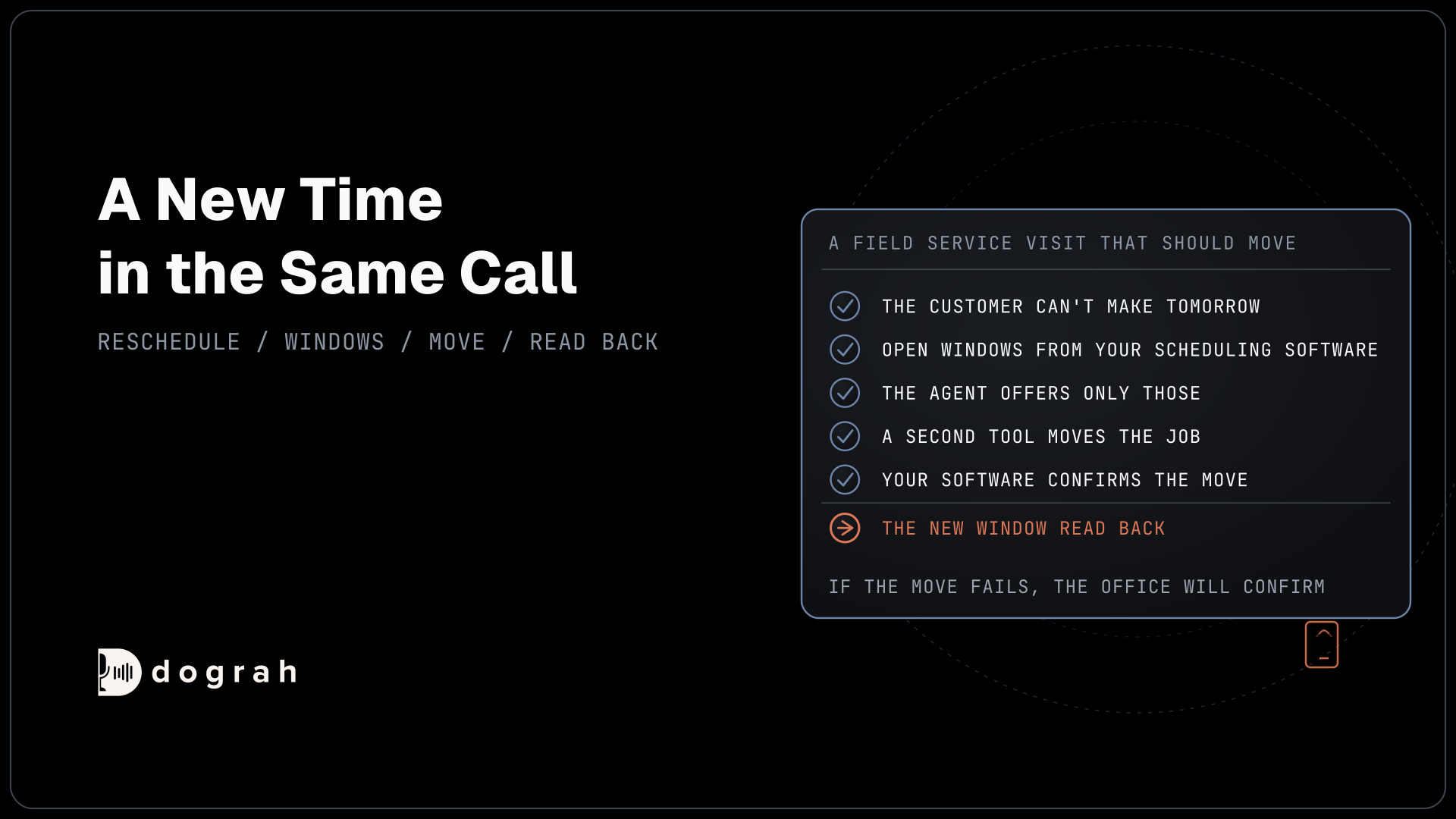
A customer who can't make tomorrow gets a new time before the call ends. An HTTP API tool asks your scheduling software for open windows, the agent offers only those, and a second tool moves the job. The move counts once your software confirms it, and the agent reads the new window back.
If a move could be sent twice, add a Preset Parameter named workflow_run_id with the value {{initial_context.workflow_run_id}}, so your system ignores the duplicate. HTTP API tools do not retry on their own, so tell the agent in its prompt to say the office will confirm if the move fails. Our post on home-services reschedules and cancellations covers cancellation policies and the visits a business has to move itself.
Join the Dograh Community
Dograh is an OSS alternative to Vapi. Join our Slack community for queries, releases, best practices & community interactions.
The on-the-way call
The on-the-way call starts when the van does. When the dispatcher marks the job en route, your field service software sends a request to the API Trigger with the phone number and the job details, and the call is placed straight away. The agent verifies the customer, confirms someone is home, repeats any access note and asks about anything new, such as a car now blocking the drive.
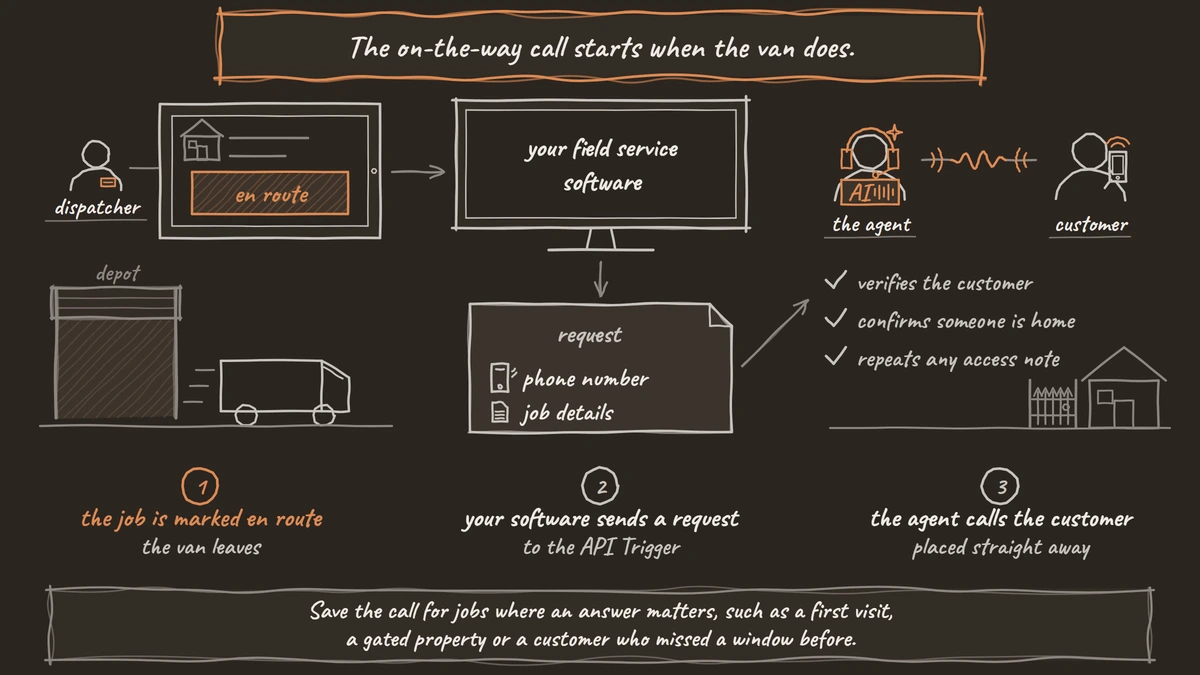
A plain "your technician is on the way" notice can go as a text from your own system, with no voice agent involved. Save the call for jobs where an answer matters, such as a first visit, a gated property or a customer who missed a window before. If nobody picks up, voicemail handling is off by default, and once on, any message names your company and a callback number only. Our post on API triggers shows the request your software sends.
Consent and where to start
A reminder about a booked visit carries no offer, and that keeps it a service call. The FCC's ruling on AI-generated voices places the agent's voice under the Telephone Consumer Protection Act (TCPA), and the FCC's calling rules require the customer's prior express consent for such a call to a mobile phone, with the business named at the start. Keep any offer, such as a maintenance plan, out of these calls, and confirm your setup with counsel.
Start with the day-before call on one route, and compare the next month's wasted trips with the last. Add the on-the-way call once the day-before answers write cleanly to the job. Test both over a real phone, where most calls reach the agent as 8 kHz audio, and read the transcripts from the first week. After that, built-in QA can check a sample of calls every day.
Glossary
- Wasted trip
- A visit where the technician arrives and cannot do the job, because nobody is home, the gate is locked or the customer forgot. The day-before call asks the access questions that prevent it.
- Pre-Call Data Fetch
- A Start Call node setting that sends the call's numbers to your endpoint as the call connects and loads the job as it stands now. The greeting waits for it.
- API Trigger
- A URL your own software calls to start an outbound call with the phone number and job details. The call is placed as soon as the request arrives.
- Preset Parameter
- A fixed or templated value an HTTP API tool always sends. Sending workflow_run_id as one lets your scheduling software ignore a move that arrives twice.