
Voiceflow vs LiveKit pits hosted conversation design against open realtime infrastructure. Designers build chat and phone agents on Voiceflow's cloud canvas. LiveKit gives engineers a media server, SIP stack and agent framework, hosted or self-hosted. For a visual builder you can self-host, Dograh, the open-source AI voice agent platform, is a middle path, and it also runs on Dograh Cloud.
Key Takeaways
- LiveKit Phone Numbers are US-only and inbound-only, so outbound runs on a trunk or connector.
- Voiceflow numbers now dial out through the API, from the US or Canada.
- LiveKit's browser Agent Builder deploys only simple agents, with workflows and handoffs left to code.
Voiceflow and LiveKit sit on different layers of a voice agent. We line them up in one table, then cover the layers, the media and phone setup, hosting and data, the skills each needs and where each wins, before showing open-source Dograh as a middle path.
Voiceflow vs LiveKit in one table
Voiceflow shapes the conversation, and LiveKit carries the audio and runs the agent code. The rows below compare them on what changes a phone agent project.
| Voiceflow | LiveKit | |
|---|---|---|
| What it is | Hosted agent platform for voice and chat, built in a visual Studio | Open realtime media server and SIP stack, plus the Agents framework and LiveKit Cloud |
| Code and license | Closed, all hosted on Voiceflow | Agents under Apache-2.0, turn detector under the LiveKit Model License |
| Who runs the media | Voiceflow's cloud, on a Voiceflow number or your carrier | LiveKit's WebRTC media server and SIP stack, on Cloud or your servers |
| Phone numbers | US and Canadian numbers bought in Voiceflow, or your Twilio, Vonage, Telnyx or SIP | LiveKit Phone Numbers in the US for inbound, or any third-party SIP trunk |
| Outbound and transfer | Outbound through the API, call forward to a number or SIP address | Outbound through a SIP trunk or the Twilio Connector on Cloud, no transfer on LiveKit numbers yet |
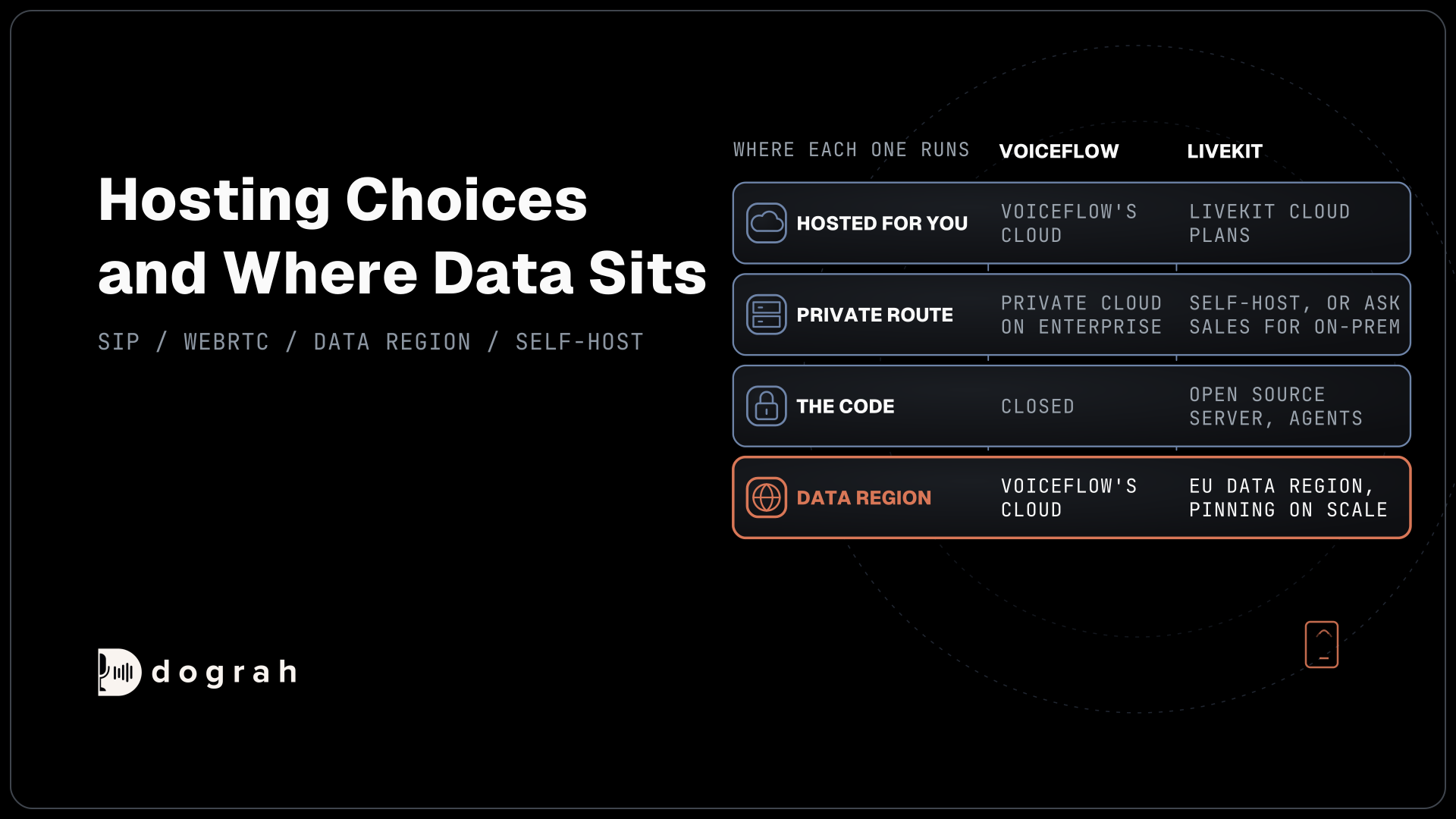
| Hosting choices | Voiceflow's cloud, private cloud on Enterprise | LiveKit Cloud plans, self-hosting, or on-prem through sales |
| Data region | Voiceflow's cloud | An EU data region for LiveKit Cloud projects, region pinning on Scale |
| Who builds | Designers and ops on a canvas | Engineers in Python or Node.js, with the agent as code in a repo |
| Price shape | Monthly plan fee, seats, add-ons and credits | Build $0, Ship from $50, Scale from $500, with $0.01 an agent minute past Ship and Scale allowances |
The rows that decide most projects are who runs the media, the phone setup and who builds. The rest of the post walks through them.
Two different layers of a voice agent
Voiceflow works on the conversation, and LiveKit works on the media and the connection underneath it. A Voiceflow agent is a designed flow of prompts, steps and integrations, and Voiceflow runs the call that carries it. LiveKit moves audio and video in real time between people and agents, and its Agents framework is where engineers write the agent itself.
That makes them less direct rivals than they first look. Voiceflow never asks you to think about media servers or codecs, which is the point for a design team, and SIP comes up only if you pick Voiceflow SIP or your own. LiveKit asks you to think about all of them, and in return lets you shape every hop a packet of audio takes. Our post on LiveKit vs Twilio for voice agents covers the line between a media layer and a phone carrier in more depth.
For phone agents the layer matters early. SIP trunking is the most reliable route for production calls, while WebRTC suits browser-based agents, and it pays to know which one your agent needs before you pick a stack. Voiceflow makes that choice for you, while LiveKit offers both and leaves the wiring to your team.
Who runs the media and the call
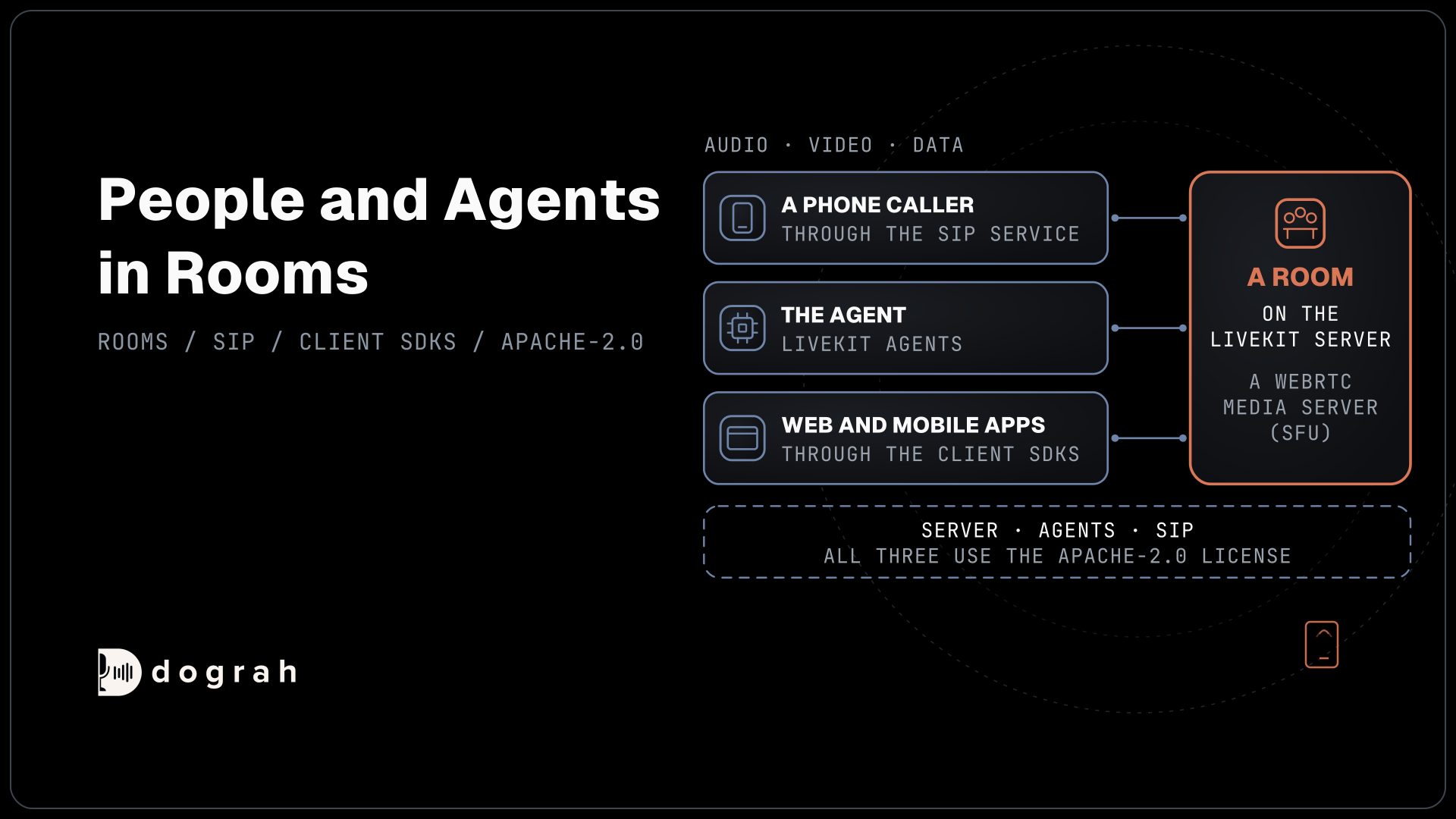
LiveKit runs its own media. It bundles a WebRTC media server and a SIP stack, and the company states that the Agents framework and media server are open source and can be self-hosted. The LiveKit Agents repo carries the Apache-2.0 license, with Python and Node.js versions, and the turn detection models sit under a separate LiveKit Model License.
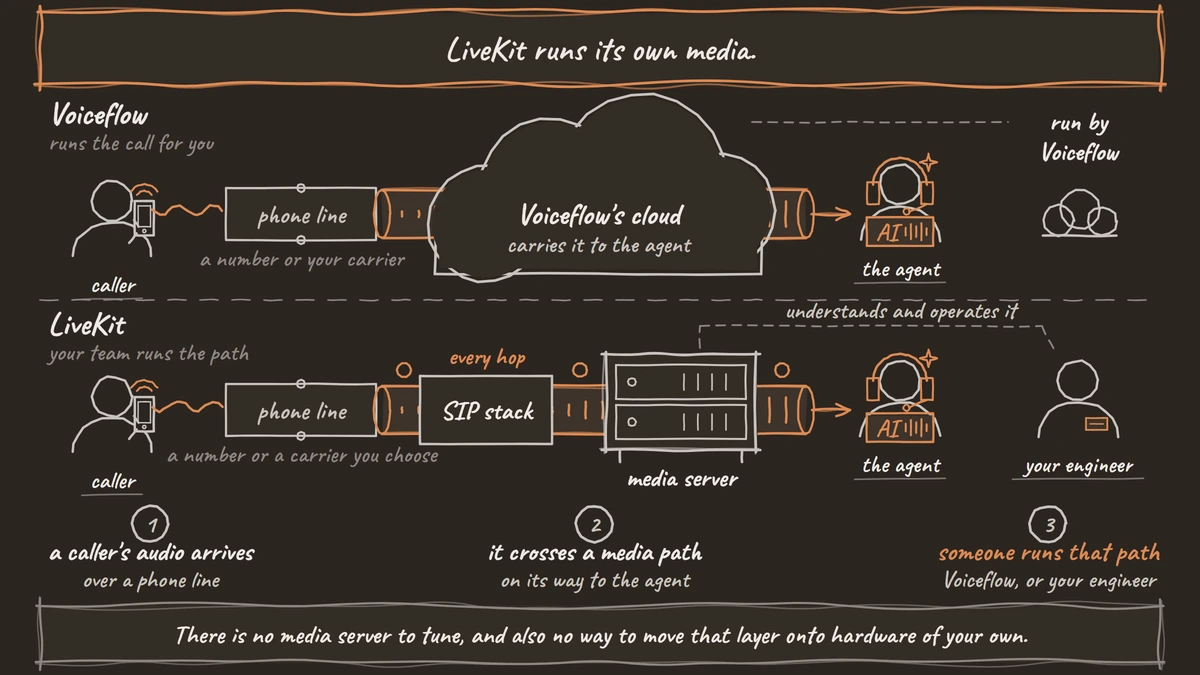
That ownership is the main reason engineers pick it. You can see every hop the audio takes, run the media server next to your agents to cut network trips, and handle video, multi-party rooms and devices as well as phone calls. The cost is that someone on your team has to understand and operate that media path.
Voiceflow runs the call for you. Audio arrives over a Voiceflow number or the carrier you connect, Voiceflow's cloud carries it to the agent, and the speech-to-text and voice providers are picked per environment in its settings. There is no media server to tune, and also no way to move that layer onto hardware of your own.
Phone setup on each
Voiceflow gives you a number quickly. Numbers bought through Voiceflow are US or Canadian, and you can connect your own Twilio, Vonage or Telnyx number, Voiceflow SIP or your own SIP instead. Its own numbers now dial out through the API, with no trunk to set up. To reach a person, it forwards the call to a phone number or a SIP address.
LiveKit sells numbers too, with tighter limits. LiveKit's Phone Numbers docs say they are "Available only in the US", that "Only inbound calling is supported", and that forwarding calls with the TransferSIPParticipant API is not yet supported on them. Each plan includes one free US local number, with more at $1.00 a month on Ship and Scale.
For anything beyond that, the main route is a third-party SIP trunk from a carrier you choose. Outbound calls, numbers outside the US and transfers can all run through that trunk, with SIP minutes included on each plan and $0.004 a minute past the Ship allowance. The trunk gives you full call control and also one more vendor contract and set of credentials to manage. On LiveKit Cloud, the Twilio Connector also places inbound and outbound calls over WebSockets with no SIP, and a WhatsApp connector takes WhatsApp calls.
The practical split is simple. A Voiceflow team can buy a number and place outbound calls the same day. A LiveKit team that needs outbound or non-US numbers sets up a SIP trunk or, on Cloud, the Twilio Connector first, then gets more control over the call than Voiceflow exposes.

Open Source Alternative to Vapi / Retell
Self-hosted voice agent platform — no per-minute fees
dograh-hq/dograh
Star on GitHub
Hosting choices and where data sits
Voiceflow keeps everything in its own cloud and says so plainly, "All hosted on Voiceflow". Enterprise plans add private cloud hosting, single sign-on and custom credit allotments. For a team that needs the agent on its own servers, private cloud on Enterprise is the closest Voiceflow offers.
LiveKit gives you three routes. LiveKit Cloud's Build plan is free with 1,000 agent session minutes, Ship starts at $50 a month with 5,000, and Scale starts at $500 with 50,000. Ship and Scale then bill $0.01 an agent minute past their allowance. You can also self-host the open-source media server and agents, or ask its sales team about on-premise and private deployments. Our breakdown of LiveKit pricing works through a month on each plan.
Region choice is where LiveKit gives buyers more to point at. A LiveKit Cloud project created with the EU data region stores its analytics, transcripts and recordings in the EU. Agents deployed to the eu-central region run there too, which builder agents do by default, and the Scale plan adds region pinning. On a self-hosted install, the data stays wherever your servers are, which is the strongest answer to a strict residency rule.
Control and the skills each team needs
The two products want different people. Voiceflow is built for conversation designers and operations staff, who lay out the agent on a canvas, test it in the browser and publish without writing code. When the call script changes, the person who runs the calls can usually change it.
LiveKit is built for engineers who write the agent as code. LiveKit's own comparison of Retell, Vapi and LiveKit argues that "the agent is a program in your repo", so changes go through pull requests, code review, tests and CI like the rest of your stack. That suits a team that already ships software this way and wants every change reviewed.
LiveKit does have a browser builder, with a clear limit. LiveKit's Agent Builder lets you "Prototype simple voice agents directly in your browser" and deploys them to production on LiveKit Cloud, with a download button that exports the agent as a Python project. It is "not intended to replace the LiveKit Agents SDK", and workflows, handoffs, vision and tests stay in code. In practice it suits simple agents, and anything with branching steps moves to the SDK.
LiveKit is open about what it leaves to you. Its comparison concedes there is "no visual editor or pre-packaged outbound calling campaign product", and that dial lists, schedules, pacing and reports are yours to build. Our comparison of Voiceflow vs Pipecat looks at that product layer from the framework side.
Where Voiceflow wins and where LiveKit wins
Voiceflow wins when a non-developer should own the agent. Chat and phone projects live in one workspace, the numbers dial out without a trunk, there is nothing to host, and a fully managed rollout is on offer for businesses that want one. WebRTC.ventures, an agency that builds custom stacks, still says managed platforms "are excellent for validating that voice AI works for your use case".
LiveKit wins when you want to own the media path and the code. It handles video, multi-party rooms and devices as well as calls, runs on your own servers if you like, offers an EU data region on Cloud and includes agent minutes on each plan. WebRTC.ventures puts the line at "custom flows, observability, or high call volumes", saying that below that threshold "a managed platform ships faster".
The deciding question is usually skills more than features. A team with no engineers to spare will struggle with SIP trunks, media servers and campaign code. A team of engineers that wants every hop under review will find a hosted design tool too closed.
Join the Dograh Community
Dograh is an OSS alternative to Vapi. Join our Slack community for queries, releases, best practices & community interactions.
A middle path between Voiceflow and LiveKit
Dograh, the open-source AI voice agent platform, is a middle path between the two. Non-developers build agents on a visual workflow builder, a canvas of nodes and pathways, as they would in Voiceflow, while the code stays open and self-hostable as LiveKit's does. On Dograh Cloud, new agents can also start from a conversational Agent Builder that drafts the agent from a description.
The phone layer comes built in, on Dograh's own Pipecat fork. Its telephony integrations cover Twilio, Telnyx, Plivo, Vonage, Exotel, Vobiz, Cloudonix, Asterisk ARI and WhatsApp, and Transfer Call works on Twilio, Telnyx, Plivo, Cloudonix and Asterisk ARI. It calls the destination first and connects the caller only when someone answers. Campaigns dial call lists within calling hours, and Agent Runs keeps each call's transcript and recording.
The code is under the BSD 2-Clause license, and a Docker Compose install needs a server with at least 8 GB of RAM and 4 vCPUs. The Enterprise plan adds on-premise or private-cloud deployment with data residency.
On your own servers there is no per-minute platform fee, and what you pay for is the hosting, the model keys and the phone minutes. Your engineers keep the database and upgrades running, with help from the open-source community, or a custom SLA if you are on Enterprise. Dograh Cloud is the hosted option, at a 1¢-a-minute platform fee plus models and phone minutes.
Glossary
- Media server
- The server that receives and forwards live audio and video between callers and agents. LiveKit ships its own WebRTC media server, open source and self-hostable.
- SIP trunk
- A carrier connection that carries phone calls over the internet using SIP. It is LiveKit's main route for outbound calls and numbers outside the US.
- TransferSIPParticipant
- LiveKit's API for forwarding a call to another number. LiveKit says it is not yet supported on calls to LiveKit Phone Numbers.
- Agent session minute
- LiveKit Cloud's billing unit, a minute an agent spends in a session, with 1,000 to 50,000 included by plan and $0.01 a minute after that on Ship and Scale.