
The best voice AI observability and testing tools depend on the stage. Before launch, Coval, Hamming, Cekura and Roark simulate callers. In production, Tuner, Roark and Cekura monitor live calls. For one bad call, Langfuse traces the model steps. Dograh, the open-source AI voice agent platform we build, has built-in QA and traces, self-hosted or on Dograh Cloud.
Key Takeaways
- Pick tools by stage, before launch, live monitoring or debugging one call.
- LLM tracing records prompts and tool calls but never hears the audio.
- A speech vendor's dashboard covers its own layer and misses the agent's choices.
No single tool covers a voice agent from its first test to a bad call months later. We start with Dograh's built-in checks, then group the specialist tools by stage, price them, and show which layer each one cannot see. A short routine ties the stages together.
The tools by stage, in one table
Each tool earns its place at one or two stages, and none covers all three well. Prices are each vendor's list price.
| Tool | Stage | What it checks | Open source | Price |
|---|---|---|---|---|
| Dograh | All three, on your own agent | Per-step QA on test and live calls, a trace per call, test calls from the editor | Yes, BSD-2-Clause | Part of the platform. Self-hosted, no per-minute platform fee. Dograh Cloud, 1¢/min |
| Coval | Before launch | Simulated callers and CI regression runs | No | $100/mo for 100 minutes, $500/mo for 1,000. Enterprise from $4,500/mo |
| Hamming | Before launch and live | Accents, interruptions, keypad and IVR trees, every live call scored | No | Quoted per deployment |
| Cekura | Before launch and live | Simulated calls, red teaming, load, live monitoring | No | $0.25 per voice testing minute, $0.05 per monitored call |
| Roark | Before launch and live | Simulation over phone and web in 45 languages, monitoring, call replay | No | $0.15/min plus provider costs |
| Tuner | Live, with simulations | Call traces, 30+ voice metrics, alerts, simulations | No | Free start. Builder $39/mo for about 1,000 calls |
| Cyara | Before launch and live | Contact-center journeys, carrier and call quality, caller ID | No | Priced through a sales demo |
| SIPp | Before launch | SIP call load on your phone path | Yes, GPL-2.0 or later | Free |
| Langfuse | Debugging | Prompts, tool calls and replies, step by step | Yes, MIT core | Self-host free. Cloud from free to $199/mo and up |
Read the table one stage at a time. Most teams pair the platform's own checks with one specialist for the stage that worries them most.
Dograh, with QA and traces built in
Dograh comes first here as the platform your agent runs on, which is where checking starts. It does not compete with the simulation specialists below. Its code is open under BSD-2-Clause, and you can self-host it or use Dograh Cloud, with on-prem deployment on Enterprise.
The QA node reviews each finished call and scores every step of the conversation separately. Each step gets tags such as DEAD_AIR or ASSISTANT_IN_LOOP, a score from 1 to 10, a sentiment and a summary, and the call lists all its tags together. It runs on test calls from the editor and on live calls, and a Sample Rate below 100 picks live calls at random.
For one call, View Trace opens the run in Langfuse tracing, with the speech-to-text, AI and voice time for every turn. Test calls run from the editor's Test Audio and Test Chat tabs, and a phone call from the editor tests the real line, which is the only way to check a transfer.
For many calls, the Noveum integration exports each finished call as a trace with per-turn speech-to-text, model and voice spans, and the audio if you turn it on. A BigQuery export suits teams that want the rows in their own warehouse, and the Tuner node sends calls to Tuner and lets it call your agent with generated scenarios.
What Dograh leaves to a specialist is simulated callers at volume and load generation. Pair it with a tester for those.
Built-in checks add no separate tool bill. Running Dograh yourself means no per-minute platform fee, but you still pay for the servers, the model keys and the phone minutes. Dograh Cloud bills a platform fee of 1¢ per minute of calls.
Self-hosting also hands your team the server, its database and every upgrade. Open-source users get community support on Slack, and Enterprise adds custom SLAs.

Open Source Alternative to Vapi / Retell
Self-hosted voice agent platform — no per-minute fees
dograh-hq/dograh
Star on GitHub
Before launch, simulate callers
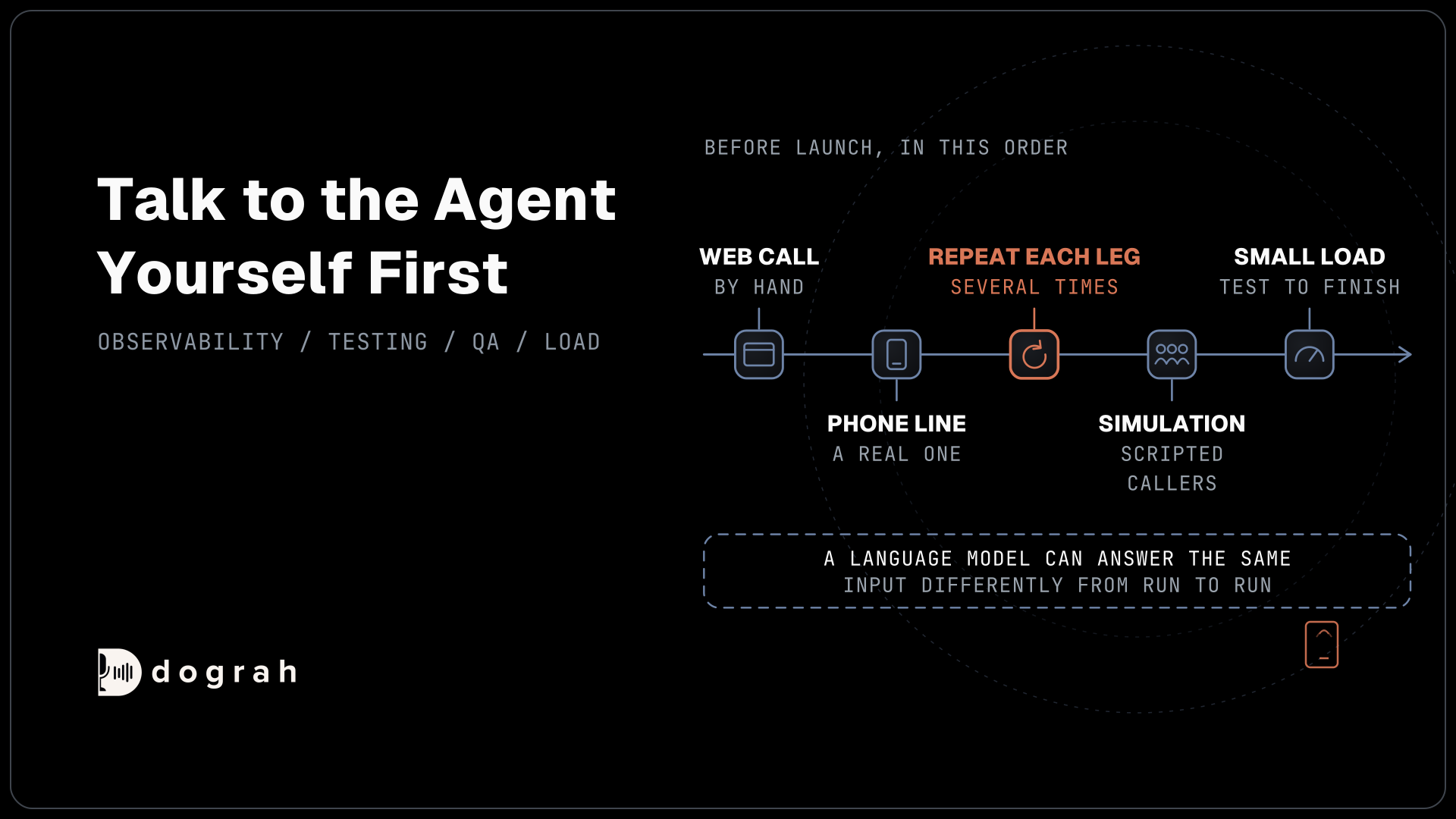
Before real callers arrive, the job is to find failures you can predict. Talk to the agent yourself first in a web call, then over a real phone line, because most phone calls still reach the agent as 8 kHz audio while a browser demo runs at 16 kHz. Then repeat each leg of the conversation several times, since a language model can answer the same input differently from one run to the next.
Simulation tools scale that up. Coval is built around simulated callers and CI regression runs, from $100 a month for 100 simulation minutes to $500 for 1,000. Hamming scripts accents, interruptions, keypad input and IVR trees and runs 50 parallel calls by default in CI, quoted per deployment. Cekura charges $0.25 per voice testing minute and adds red teaming and load tests, and Roark simulates over real phone lines and the web in 45 languages at $0.15 a minute plus provider costs.
For load alone, SIPp generates many SIP calls at once for free under GPL-2.0 or later. It shows whether your carrier, servers and providers keep up, and leaves the content of those calls to QA.
Whatever tester you pick, point it at the version callers will reach. In Dograh, inbound calls always run the published version of an agent, so publish before you simulate, and remember that a Tuner node sitting only in a draft sends nothing to Tuner.
Choosing between the testers mostly comes down to how you buy and what you test most. Our guide to Cekura alternatives compares them on one 1,500-minute test run.
In production, monitor live calls
After launch, the job changes from finding predictable failures to catching the ones nobody wrote a scenario for. Callers say things no test script covered, and they often treat an agent differently from a person.
Start with the platform's own QA on a sample. Once an agent is stable, a random 5-10% of live calls is usually enough, with 100% for the first weeks and after any flow change. Our post on Observability for Voice AI covers the latency, interruption and silence numbers worth alerting on.
Specialists add dashboards and alerts across calls. Cekura charges $0.05 per monitored call, so in an example month, watching 10,000 calls comes to $500. Hamming scores every live call and alerts to Slack, PagerDuty or a webhook. Roark adds call replay, and Tuner starts at $39 a month for about 1,000 calls with latency metrics, full call traces and alerts.
Cyara watches the parts around the agent, such as carrier quality and caller ID, and flags outbound calls that show as spam or the wrong name. That matters most for outbound teams.
Debugging one bad call
Once QA or an alert flags a call, the job is to find which layer failed. Read the transcript first, then open the trace for any call the transcript does not explain.
Langfuse is an open tracing tool, free to self-host with an MIT core, and its Cloud runs from a free Hobby plan to $199 a month on Pro. It shows the exact prompt, the tool calls and the reply for each step, and you can replay a step to count how often it fails before and after a fix.
Treat traces as customer data. A trace holds the full transcript, the prompts and the tool payloads, so limit who can open the tracing project, and keep it private if calls carry personal details. Self-hosting Langfuse keeps those traces on your own servers alongside the calls.
Per-turn timing tells you whether speed caused the problem. If speech-to-text took most of a slow turn, a prompt change will not fix it. Noveum's spans and Dograh's trace both split each turn into speech-to-text, model and voice time, so you change the layer that failed and leave the rest alone.
What each kind of tool cannot see
Every tool here watches part of the call, and the gaps matter more than the feature lists. LLM tracing tools see text. They record the prompt and the reply, but a misheard word only shows as an odd transcript and a reply cut off by line noise looks clean in the trace.
Speech vendors' dashboards fail the other way. Each covers its own layer, how fast it transcribed or spoke, and leaves the agent's choices, the tool calls and the phone path out. Simulation has its own blind spot, since scripted callers behave the way someone predicted, and real callers do not.
Automated judges have limits as well. A QA model or a tester's scorer reads the transcript and makes a call, and it can be wrong in either direction. Read a handful of its verdicts against the recordings each week, and trust its pass rate only as far as those checks hold up.
The survey data points the same way. In LangChain's State of Agent Engineering survey, run in late 2025 across AI agents in general rather than voice alone, 89% of organizations said they had observability on their agents, while 52.4% ran offline evaluations on test sets. Most teams can watch a bad call happen, and only about half test for it beforehand.
Join the Dograh Community
Dograh is an OSS alternative to Vapi. Join our Slack community for queries, releases, best practices & community interactions.
Putting the stages together
A working routine uses each stage for its own job. Before launch, test by hand on the web and over a phone line, repeat each leg several times, run a simulation suite, and finish with a small load test.
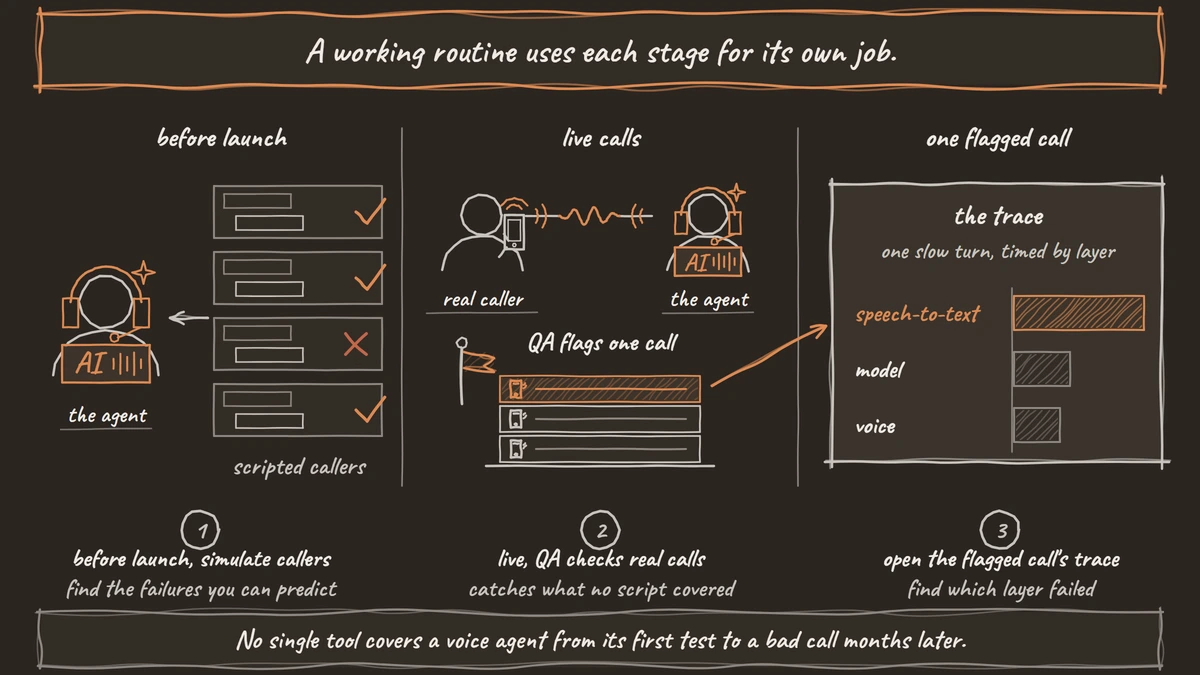
In the first weeks live, keep QA at 100%, then drop to a 5-10% sample once the flags settle. Each week, read a sample of flagged calls, open the trace for any the transcript does not explain, change one thing in the agent and rerun the scenarios that broke.
Our guide on How to Measure Voice-Agent Quality Beyond Call Completion turns that weekly review into numbers you can track, from outcome codes to step scores. Start with the checks your platform already has, then add the specialist for the stage where your calls actually fail.
Glossary
- Observability
- Seeing what happened inside each call after the fact, from transcripts and step scores to per-turn timing, so a failure can be traced to its layer.
- Regression run
- Re-running a fixed set of test scenarios after every change to the agent, to catch anything the change broke. Testers such as Coval run these in CI.
- Span
- One timed piece of a trace, such as the speech-to-text or the model call inside a turn. Per-turn spans show which layer made a turn slow.
- Sample rate
- The share of calls an automated review checks. Dograh's QA node starts at 100% and picks calls at random below that, and 5-10% suits a stable agent.